


|
Installing the OLAP Database
Log on to Microsoft SQL Server Management Studio/Analysis Services. Go to Databases and select Restore.... Give the OLAP database a suitable name, e g PipeChainAnalyzer, and browse to the file "PipeChainAnalyzer.abf". Press OK. After completion, go to Databases and select Refresh.
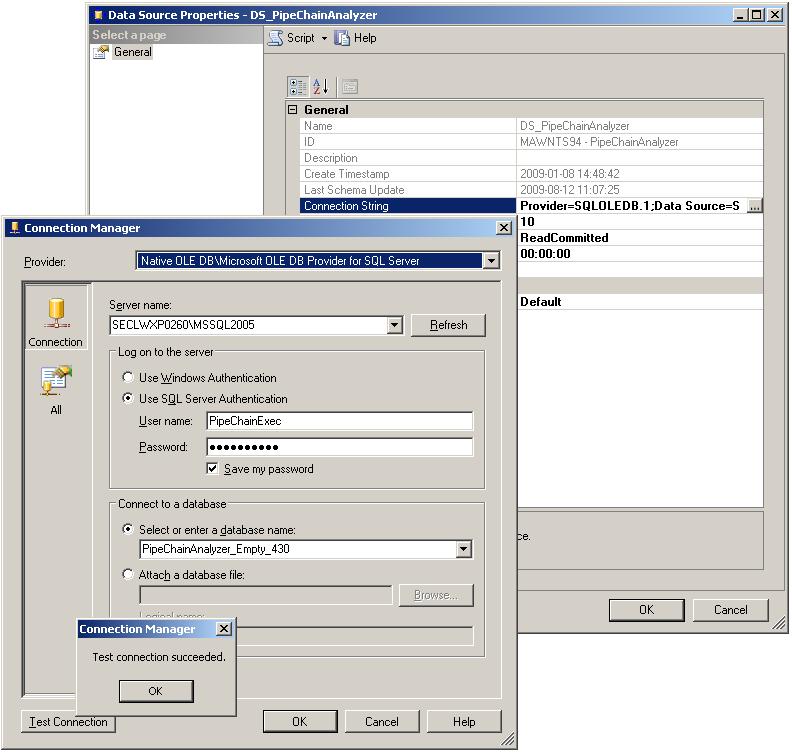
Double click on data source DS_PipeChainAnalyzer and open the connection string. Select your server\instance, login parameters and Data Warehouse database. Verify with Check Connection and save.
A Note About Collation
Please note that the PipeChain Analyzer OLAP database does not specify the collation (sorting order) of the dimensions. Therefore, you should check that Microsoft Analysis Server properties are set to a suitable collation.