


|
Transport Unit Detail
The Transport Unit Detail screen contains the information about a Transport Unit and is used for creating new Transport Unit.
You have to specify the Transport Unit (as well as the number of Transport Units used) when creating a Scheduled Weekly Shipment or Scheduled Extra Shipment.
Transport Unit Id – the ID of the Transport Unit. When you first create the Transport Unit, you enter this ID manually. After you have saved, the ID cannot be changed.
Description – this field can contain a description of the Transport Unit, if needed.
Load Capacity – several different load capacities can be defined. For example, a truck may be able to carry a certain weight. Furthermore, it has room enough for a certain number of pallets. If the pallets are heavy, you can load it with the maximum weight even though not all the space is occupied. The opposite can also happen: if the pallets are light, the truck will be fully loaded even though the truck could hold more weight.
If you click on the Create New Item button in the Load Capacity tab, you can define a new load capacity for the Transport Unit. The following dialog box opens:
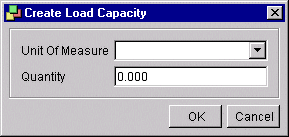
Dialog
box for defining a Load Capacity for a Transport Unit
Unit of Measure – the unit in which the quantity is given (such as kg, lb, cubic feet, cubic meters, or pallets). Choose the unit of measure by clicking on the list box in the field. The units of measure are defined in the Unit of Measure Overview screen.
Quantity – the quantity of the load capacity (e.g. 50, if the capacity is 50 pallets).